Built for Epicor Kinetic
Financial reporting for Epicor Kinetic, without the add-on price tag
Trial Balance, Balance Sheet, P&L, Equity and Cash Flow synced straight from Epicor Kinetic, with Budget & Forecasting and multi-company Consolidation on top. No more rebuilding statements by hand in Excel every close.
14 days of Professional. No payment details.
Built for Finance teams, Controllers, FP&A analysts on Epicor Kinetic.
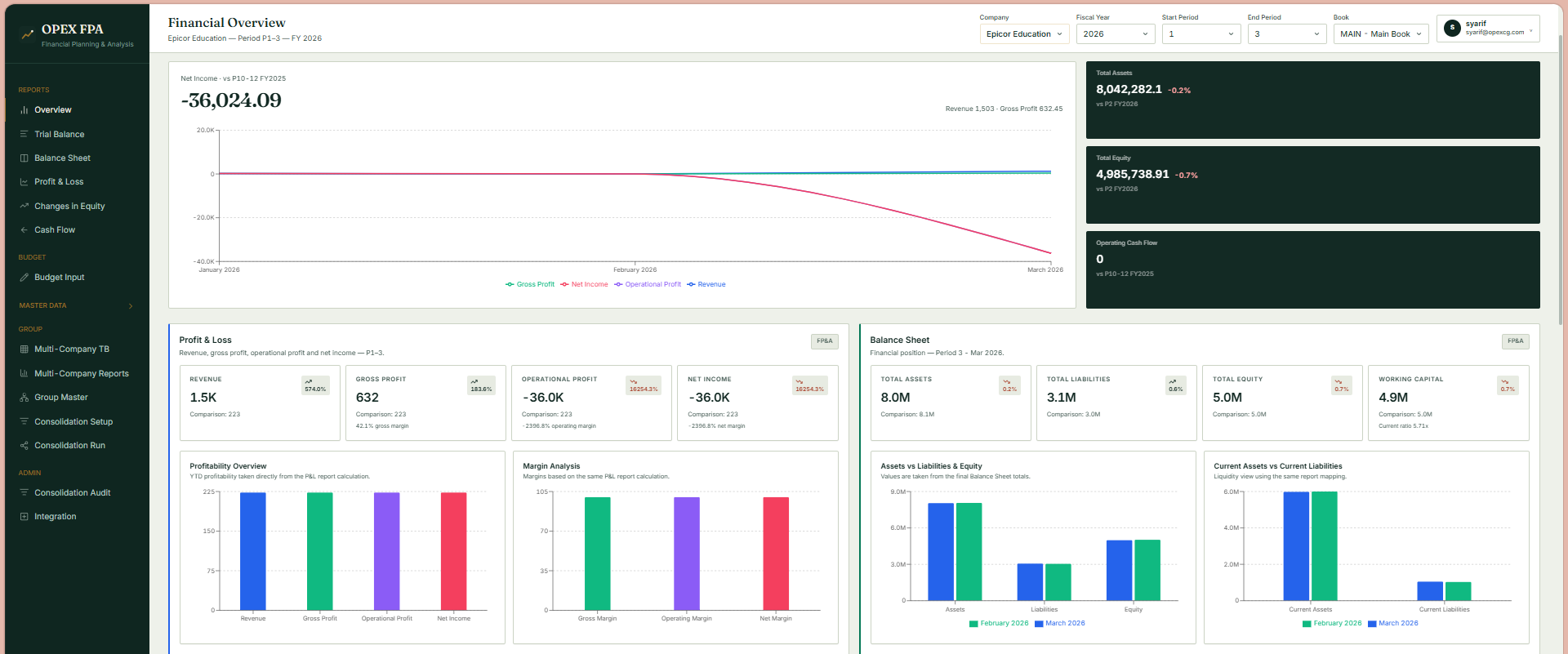
Everything finance needs, nothing it doesn't
Statements, live from Epicor
Trial balance, profit & loss, balance sheet, changes in equity and cash flow, computed from a staged copy of your Epicor balances, with drill-down to source transactions.
P&L and cash flow forecasting
Forecast the P&L from budget, run-rate or your own assumptions, and project cash for the next 13 weeks from your open AR and AP invoices. Included in Professional, an add-on for Starter.
Consolidation & IC mapping
Multi-company reports, consolidation runs, intercompany mapping and the consolidation audit. Included in Enterprise, an add-on for Professional. Rules live in the app, not in lookup tabs.
Modular ERP integration
Connections are provider-swappable (Epicor today, SAP-ready adapter), credentials are AES-256-GCM encrypted, and endpoints are derived from a single base URL.
Guided onboarding
A first-run wizard tests your Epicor connection, saves it encrypted, and runs the initial sync of companies, books, segments, GL accounts, categories and fiscal calendar.
Runs on Cloudflare
No servers to patch: the portal and this site are Cloudflare Workers, data lives in Cloudflare D1 scoped to your workspace, and every deploy goes through typecheck, lint and build gates.
AI where it helps, with the sources shown
Available on Professional and the 14-day trial. The AI works from your synced Epicor numbers, and you review what it produces.
Dashboards from a prompt
Describe the dashboard you want and the app drafts it. Then ask for changes, such as adding a budget comparison for revenue or limiting the cost charts to six months.
AI forecast rules
Describe how accounts should be forecast and the AI writes the rule set. Every rule is checked against your real accounts, and errors come back so they can be fixed before anything runs.
Ask your financials
Ask a question about your numbers and get an answer that cites its sources, so you can check it before you repeat it.
Journal anomaly scan
Fixed checks run over your GL journal lines and raise findings. For each finding the AI explains what was flagged, using your account history. It never decides whether something is an error, and you confirm or dismiss each finding yourself.
Board pack
Builds the period's board pack from the same numbers as your reports and exports it to Excel.
Live in an afternoon
Connect Epicor
Paste your OData BaqSvc root, pick an auth method, and the wizard verifies it against a live BAQ before saving anything.
Initial sync
Companies, books, account segments, GL accounts, report categories and the fiscal calendar are pulled and staged automatically.
Report
Open any statement, drill into journal details, and sync fresh data whenever you need it.
Packages for every finance team
Try Professional free for 14 days, no payment details needed. Talk to sales for a quote based on your entities and users.
Starter
One company, three users, every financial report.
Pricing on request
Ask sales for a quote.
- ✓1 company entity, 3 users
- ✓Trial balance, P&L, balance sheet, equity and cash flow
- ✓Budget vs actual, P&L filter by GL account segment
- ✓Drill-down to source transactions
- ✓Add-ons: P&L forecasting, cash flow forecasting, AI assistant
Professional
Three companies, five users, with forecasting and the AI assistant.
Pricing on request
Ask sales for a quote.
- ✓3 company entities, 5 users
- ✓Everything in Starter
- ✓P&L forecasting
- ✓Cash flow forecasting, including the 13-week view
- ✓AI assistant: dashboards, Ask, anomaly scan, board pack
- ✓Add-on: consolidation
Enterprise
Custom entity count, ten users, consolidation and priority support.
Contact sales
Priced to your entities and SLA.
- ✓Custom entity count, 10 users
- ✓Everything in Professional
- ✓Consolidation, multi-company reports and IC mapping
- ✓Consolidation audit
- ✓Priority support
Common questions
How does the free trial work?
Sign up with your email and you get 14 days of the Professional plan. No payment details are asked for. Buy a plan before the trial ends to keep your workspace going.
How do we pay?
Checkout runs on DOKU. You can pay by bank transfer, virtual account or card, and each purchase comes with an invoice. The first invoice is setup plus the first year, and renewals are the annual fee only. Tax is added per invoice. Enterprise is invoiced through our sales team.
Where is our data stored?
The app runs on Cloudflare Workers and stores data in Cloudflare D1. Every workspace's data is scoped to its own tenant. If you have a region or residency requirement, tell us through the contact form before you buy. Details are on the privacy page.
Do we still enter data in Epicor as usual?
Yes. Opex FP&A only reads from Epicor Kinetic: Trial Balance, GL Budget, and master data. Nothing changes in how your team works inside Epicor.
How is this different from Epicor's native Report Writer?
Report Writer is built in but rigid, and customizing drill-down or multi-period comparisons usually needs IT or a consultant. Opex FP&A is designed to give Finance more self-service reporting capabilities.
Can we forecast without a full-year Budget loaded in Epicor?
Yes. The forecast engine can use a trailing run-rate for accounts without a Budget line and distinguish budget-driven months from run-rate months.
Stop reconciling spreadsheets against the ERP.
Sign up with your email, connect Epicor, and see your own trial balance. 14 days of Professional, no payment details.
Start free trial